30 Nov 2025

How to Use a Cursor in SQL?

 Here's how to use a cursor in SQL with a practical example,

  1. First, we need to understand what a cursor is and why it might be useful.
  2. Then, we'll create a sample table and populate it with data.
  3. We'll define the cursor and declare variables to store the data.
  4. We'll open the cursor and fetch data from it.
  5. Finally, we'll close and deallocate the cursor.

Cursors in SQL

  • Cursors allow us to iterate through a result set one row at a time.
  • They are useful when we need to perform multiple operations on each row of a result set.
  • Cursors can be explicit (programmer-defined) or implicit (automatically created).
  • Explicit cursors give us more control over the iteration process.

Let's create a sample scenario where we have a table of employees, and we want to update their salaries based on certain criteria.

Create a sample table

-- Create a sample table
CREATE TABLE Employees (
    EmployeeID INT PRIMARY KEY,
    Name VARCHAR(50),
    Department VARCHAR(50),
    Salary DECIMAL(10, 2)
);
SQL

Insert sample data

-- Insert sample data
INSERT INTO Employees (EmployeeID, Name, Department, Salary)
VALUES
    (1, 'John Doe', 'IT', 50000.00),
    (2, 'Jane Smith', 'HR', 45000.00),
    (3, 'Bob Johnson', 'Finance', 55000.00),
    (4, 'Alice Brown', 'Marketing', 40000.00);
SQL

Let's See the Result by running this script.

SELECT * FROM [dbo].[Employees]
SQL

Output

Output

Write the script below and run it.

-- Open the cursor
OPEN EmployeeCursor;

-- Fetch the first row
FETCH NEXT FROM EmployeeCursor INTO @EmployeeID, @Name, @Department, @Salary;

-- Loop through the rows
WHILE @@FETCH_STATUS = 0
BEGIN
    -- Perform operations on the current row
    IF @Department IN ('IT', 'Finance')
        SET @Salary = @Salary * 1.1; -- Increase salary by 10% for IT and Finance departments

    -- Print the updated information
    PRINT 'Employee ID: ' + CAST(@EmployeeID AS VARCHAR(10)) +
          ', Name: ' + @Name +
          ', Department: ' + @Department +
          ', New Salary: ' + CAST(@Salary AS VARCHAR(10));

    -- Move to the next row
    FETCH NEXT FROM EmployeeCursor INTO @EmployeeID, @Name, @Department, @Salary;
END

-- Close and deallocate the cursor
CLOSE EmployeeCursor;
DEALLOCATE EmployeeCursor;
SQL

In this script, we update employees' salaries by 10% for IT and Finance.

Output

Employees' salaries

Summary

This example demonstrates how to use a cursor in SQL Server to iterate through a result set and perform operations on each row. Here's a breakdown of what the code does:

  1. We create a sample table of Employees and insert some data.
  2. We declare variables to hold the data from each row.
  3. We define the cursor based on our SELECT statement.
  4. We open the cursor and fetch the first row.
  5. We use a WHILE loop to continue fetching rows until there are no more rows to fetch.
  6. Inside the loop, we perform operations on the current row (increasing salaries for certain departments).
  7. We print the updated information for each row.
  8. Finally, we close and deallocate the cursor.

DATETRUNC New T-SQL Enhancements in SQL Server

 In this article, we'll explore how the new DATETRUNC function works, look at some practical use cases, and examine how it differs from traditional data manipulation methods. This article is written for SQL developers, DBAs, and data engineers who are looking to understand how to leverage this new functionality in SQL Server 2022.

Understanding DATETRUNC

The DATETRUNC function allows you to truncate a datetime or datetime2 value to a specified date part. This means you can strip the time portion or reduce the precision of a date down to a specific unit such as a year, quarter, month, day, hour, minute, or second. The DATETRUNC function is a more streamlined and expressive way to handle date truncation compared to the traditional methods involving DATEADD, DATEDIFF, and CONVERT.

Syntax

DATETRUNC ( datepart, expression )

--datepart: The part of the date to truncate. This can be year, quarter, month, day, hour, minute, second, etc.
--expression: The datetime, smalldatetime, date, or datetime2 expression to truncate.
SQL

Examples

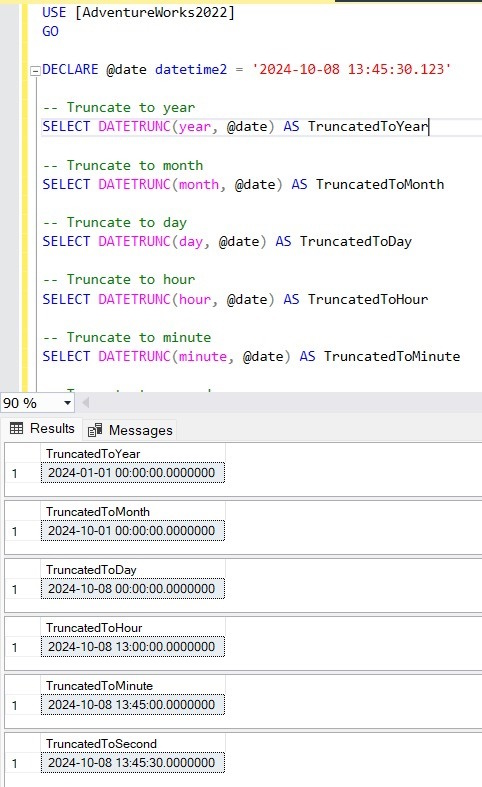
Here’s an example of truncating a DateTime value to different date parts using DATETRUNC.

USE [AdventureWorks2022]
GO

DECLARE @date datetime2 = '2024-10-08 13:45:30.123'

-- Truncate to year
SELECT DATETRUNC(year, @date) AS TruncatedToYear

-- Truncate to month
SELECT DATETRUNC(month, @date) AS TruncatedToMonth

-- Truncate to day
SELECT DATETRUNC(day, @date) AS TruncatedToDay

-- Truncate to hour
SELECT DATETRUNC(hour, @date) AS TruncatedToHour

-- Truncate to minute
SELECT DATETRUNC(minute, @date) AS TruncatedToMinute

-- Truncate to second
SELECT DATETRUNC(second, @date) AS TruncatedToSecond
SQL

Output

Output

Use Cases

DATETRUNC offers several advantages for common date truncation use cases in SQL Server, making it easier to,

  • Group by a Specific Date Part: You can use DATETRUNC to group data by a specific date part (e.g., by month, day, or hour).
  • Remove Time from Datetime Values: Often, developers need to work with only the date part, ignoring the time part.
  • Aggregate Data at Different Levels: DATETRUNC makes it easy to aggregate data at different levels of granularity such as hourly, daily, weekly, or monthly.
  • Date Range Filtering: DATETRUNC helps simplify date-based filtering where you need to match specific parts of a date.

Comparing DATETRUNC with Traditional Methods

Before the introduction of DATETRUNC, SQL Server developers typically used a combination of DATEADD, DATEDIFF, and CONVERT to achieve similar results. Let’s compare DATETRUNC with traditional approaches.

Truncating to Day

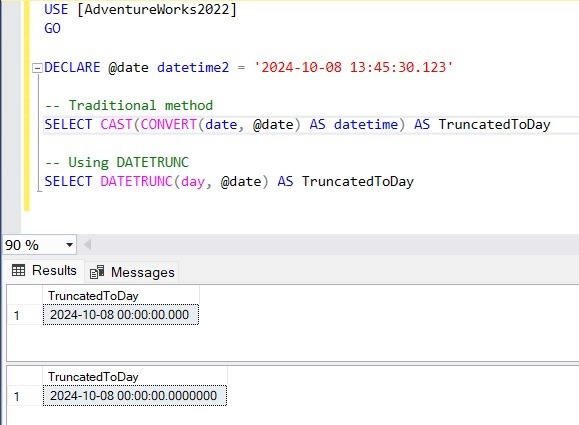
The DATETRUNC approach is much simpler and more intuitive compared to the CAST and CONVERT methods. Here’s how you might truncate a datetime value to the day using traditional methods:

USE [AdventureWorks2022]
GO

DECLARE @date datetime2 = '2024-10-08 13:45:30.123';

-- Traditional method
SELECT CAST(CONVERT(date, @date) AS datetime) AS TruncatedToDay;

-- Using DATETRUNC
SELECT DATETRUNC(day, @date) AS TruncatedToDay;
SQL

Output

SQL

Truncating to Month and Year

USE [AdventureWorks2022]
GO

DECLARE @date datetime2 = '2024-10-08 13:45:30.123';

-- Truncating to Month
-- Traditional method
SELECT DATEADD(month, DATEDIFF(month, 0, @date), 0) AS TruncatedToMonth;

-- Using DATETRUNC
SELECT DATETRUNC(month, @date) AS TruncatedToMonth;

-- Truncating to Year
-- Traditional method
SELECT DATEADD(year, DATEDIFF(year, 0, @date), 0) AS TruncatedToYear;

-- Using DATETRUNC
SELECT DATETRUNC(year, @date) AS TruncatedToYear;
SQL

Conclusion

By replacing more complex combinations of DATEADD and DATEDIFF with a single, readable function, DATETRUNC helps reduce query complexity, improve maintainability, and streamline date-based calculations.

As a SQL professional, mastering DATETRUNC will enhance your ability to write clean and efficient T-SQL code, making it easier to work with DateTime data in SQL Server 2022. Whether you're aggregating sales by month or grouping website traffic by hour, DATETRUNC can be a valuable tool in your SQL library.

SQL EXISTS vs IN vs JOIN Performance Comparison


Problem

I built a query that utilizes a subquery that needs to be compared back to a main query. I want to know how to best achieve this task. Should I use an IN statement? An EXISTS? Or maybe a JOIN? I need to know which options will be valid for my use case and which one will perform the best. I also need to be able to prove it.

Solution

As with many situations within SQL Server the answer depends on the circumstances. This tip will look at the pros and cons of each method and use a repeatable methodology to determine which method will offer the fastest performance. The best part about this tip is that the performance comparison methodology can be applied to any TSQL coding situation!

Compare SQL Server EXISTS vs. IN vs JOIN T-SQL Subquery Code

All of the demos in this tip will use the WideWorldImporters sample database which can be downloaded for free from here and will be run against SQL Server 2019. The images might be different, but the methodology should still work on older versions of SQL Server.

The subquery to be used will be a list of the top 3 sales people for a single quarter based on invoice count. For the simplicity of the example queries, this subquery will be stored as a view. As seen in this tip, for a simple query like this one, there likely isn't a difference in performance between using a view, CTE, or traditional subquery.

CREATE VIEW vTop3SPs2013Q2
AS
SELECT TOP 3 SalespersonPersonID
FROM Sales.Invoices
WHERE InvoiceDate BETWEEN '4/1/2013' AND '6/30/2013'
GROUP BY [SalespersonPersonID]
ORDER BY COUNT(*) DESC

SQL IN Code

The IN statement can be used to find rows in a query where one column can be matched to a value in a list of values. The list of values can be hard coded as a comma-separated list or can come from a subquery as it does in this example.

IN statements are easy to write and understand. The only downside is that they can only compare a single column from the subquery to a single column from the main query. If 2 or more values need to be compared then the IN statement cannot be used.

Below is a query that returns some invoices that belonged to our top group of salespeople. Notice that the subquery returns exactly one row. This is a requirement for use of the IN statement. Also note that the query inside the parentheses is a fully functional query on its own. It can be highlighted and executed by itself.

SELECT Invoices.InvoiceID, Invoices.TotalDryItems, People.FullName
FROM Sales.Invoices
  INNER JOIN [Application].People ON Invoices.SalespersonPersonID = People.PersonID
WHERE SalespersonPersonID IN (SELECT SalespersonPersonID FROM vTop3SPs2013Q2)
  AND InvoiceDate BETWEEN '4/1/2013' AND '6/30/2013'
  AND TotalDryItems >= 4;

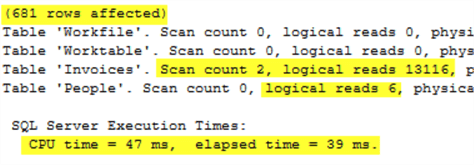
Executing that query with both STATISTICS IO and STATISTIC TIME enabled, outputs this information. This output will give us some metrics for performance to compare to the other options. If unfamiliar with how to get this output, please consult this tip.

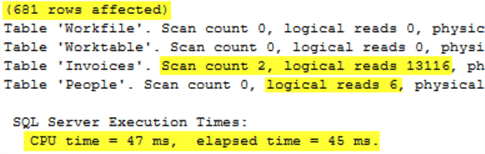
This screenshot of the output shows that the query returned 681 rows and used 13,116 reads from Invoices and 6 reads from People.  It executed in 39ms.

SQL EXISTS Code

The EXISTS statement functions similarly to the IN statement except that it can be used to find rows where one or more columns from the query can be found in another data set, usually a subquery. Hard coding isn't an option with EXISTS.

Below is the same query as above except that the IN has been replaced by EXISTS. The format for EXISTS and its subquery is a little bit different than for IN. In this case, the subquery references a column, I.SalespersonPersonID, that does seem to be available to the subquery. For this reason, the subquery cannot be executed on its own and can only be executed in the context of the entire query. This can sometimes be difficult to understand.

Logically, think of it as having the subquery run once for every row in the main query to be determined if a row exists. If a row exists upon executing the subquery, then the Boolean return value is true. Otherwise, it is false. The selected column(s) of the subquery does not matter as the result is tied only to the existence or non-existence of a row based on the FROM/JOIN/WHERE clauses in the subquery.

SELECT I.InvoiceID, I.TotalDryItems, People.FullName
FROM Sales.Invoices I
  INNER JOIN [Application].People ON I.SalespersonPersonID = People.PersonID
WHERE EXISTS (SELECT 1 FROM vTop3SPs2013Q2 WHERE SalespersonPersonID = I.SalespersonPersonID)
  AND I.InvoiceDate BETWEEN '4/1/2013' AND '6/30/2013'
  AND I.TotalDryItems >= 4;

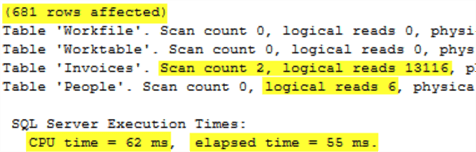
Executing this query returns the following statistical output which is virtually identical to the IN statement.

sql server execution

SQL INNER JOIN Code

A regular JOIN can be used to find matching values in a subquery. Like EXISTS, JOIN allows one or more columns to be used to find matches. Unlike EXISTS, JOIN isn't as confusing to implement. The downside to JOIN is that if the subquery has any identical rows based on the JOIN predicate, then the main query will repeat rows which could lead to invalid query outputs. Both IN and EXISTS will ignore duplicate values in a subquery. Take extra precaution when joining to a table in this fashion. In this example, the view will not return any duplicate SalespersonPersonID values, so it is a safe implementation of a JOIN.

SELECT I.InvoiceID, I.TotalDryItems, People.FullName
FROM Sales.Invoices I
  INNER JOIN [Application].People ON I.SalespersonPersonID = People.PersonID
  INNER JOIN vTop3SPs2013Q2 ON I.SalespersonPersonID = vTop3SPs2013Q2.SalespersonPersonID
WHERE InvoiceDate BETWEEN '4/1/2013' AND '6/30/2013'
  AND TotalDryItems >= 4;

Executing this query returns the following statistical output which is, once again, virtually identical to the IN and EXISTS statement versions of the query.

sql server execution time

Why are all of the statistics the same?

The statistics for each of these 3 options are virtually identical because the optimizer is compiling all 3 options into the same query plan. This can be seen by running all three queries together while viewing the actual execution plans. The screenshot below shows one plan, but the exact same plan appears in each of the 3 query options.

create nonclustered index

Each copy of the query plan shows a missing index recommendation. Acting on that recommendation and creating the index will modify the plans and query performance statistics. Will it modify them all the same way? Let's find out. First, make the index, then rerun the 3 queries.

CREATE NONCLUSTERED INDEX mssqltips ON [Sales].[Invoices] ([InvoiceDate],[TotalDryItems]) 
   INCLUDE ([InvoiceID],[SalespersonPersonID]);

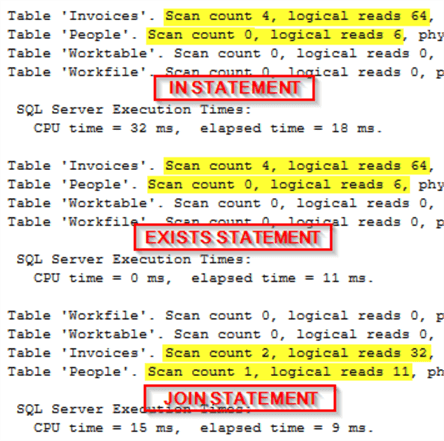
Now execute all 3 statements together again. Something interesting happens. All 3 plans have changed from the versions they were before the index creation, but they are not identical this time. The IN and EXISTS got the same new plan, but the JOIN gets a different plan.

The plan for the IN and EXISTS used the new index twice and performed a SEEK on the People table.

nested loops

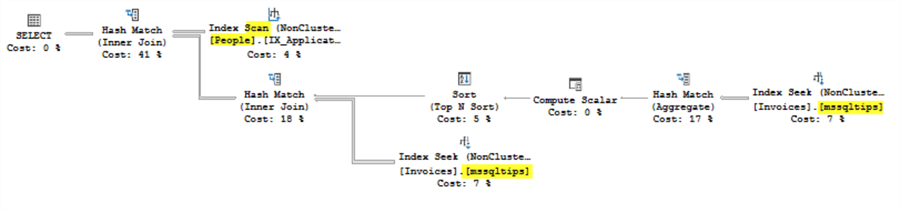
This plan was generated for the JOIN version of the query. It used the new index twice, but performed a SCAN on the people table.

index scan

Checking the IO and TIME statistics for the 3 queries shows identical statistics for the 2 queries that shared a plan, but improved statistics and execution time for the JOIN version. If this were a query getting ready to be promoted to production, going with the JOIN would probably be the best bet.

sql server execution times

Conclusion

This query is a great example that while the optimizer strives to treat each option the same, it won't always do that. Using this performance verification methodology, along with understanding the value and limitations of each query option, will allow the programmer to make the best choice in each situation.

Best SQL Query to Find Duplicates – Step by Step Guide

 inding duplicate rows is one of the most common tasks in SQL, especially when working with real-world data like customer records, invoices,...