Showing posts with label T-SQL. Show all posts

1 Dec 2025

Cloud Integration and Hybrid Data Solutions

 Cloud integration and hybrid data solutions involve combining on-premises infrastructure with cloud services to create flexible, scalable, and efficient data environments. This approach allows organizations to leverage the strengths of both local (on-premises) and cloud-based systems, enhancing performance, availability, and data management capabilities.

Here’s a deeper dive into Cloud Integration and Hybrid Data Solutions:

1. Hybrid Cloud Architecture

A hybrid cloud architecture combines private (on-premises) and public cloud environments. It allows data and applications to move between these environments, enabling:

  • Flexibility: Workloads can be managed dynamically across on-premises and cloud environments based on performance, cost, or security needs.
  • Cost Efficiency: You can keep sensitive or high-priority data on-premises while using the cloud for scalability and cost-effective storage.
  • Disaster Recovery & High Availability: Data can be replicated or backed up in the cloud, ensuring business continuity in case of an on-premises failure.

2. Data Integration Strategies

Organizations can integrate data from multiple sources (on-premises, cloud databases, applications, IoT devices, etc.) to create a unified data platform. Key methods include:

  • ETL/ELT: Extract, Transform, Load (ETL) or Extract, Load, Transform (ELT) pipelines move data between sources. ELT is more cloud-friendly as transformations occur after the data is loaded.
  • Data Replication: Continuous replication of on-premises data to the cloud ensures data synchronization, providing low-latency access across environments.
  • APIs: APIs connect various services, allowing applications in different environments to communicate seamlessly.

3. Cloud Data Services

Cloud platforms like Microsoft Azure, Amazon Web Services (AWS), and Google Cloud offer robust data solutions:

  • Azure Synapse Analytics: Combines big data and data warehousing, offering real-time analytics over large datasets, whether stored on-premises or in the cloud.
  • AWS Glue: Serverless data integration service that makes it easy to prepare data for analytics by combining data from various sources.
  • Google BigQuery: Serverless data warehouse with built-in machine learning, designed for handling vast amounts of data across hybrid environments.

4. Multi-Cloud Strategy

Some organizations adopt a multi-cloud approach, using services from more than one cloud provider to avoid vendor lock-in, optimize costs, and improve redundancy. A well-executed multi-cloud strategy offers:

  • Interoperability: Data and services work seamlessly across different cloud providers.
  • Data Portability: Simplified movement of workloads between different cloud environments.
  • Compliance & Regulation: Certain clouds may be chosen for specific workloads based on regional compliance or data residency requirements.

5. Edge Computing

Edge computing complements cloud and hybrid models by processing data closer to its source (e.g., IoT devices or local servers). This reduces latency and bandwidth costs, especially when processing time-sensitive data.

  • Hybrid Edge Architecture: Combines edge computing with cloud services, sending processed data to the cloud for storage or further analysis while keeping latency-critical operations local.
  • Use Cases: Real-time monitoring, predictive maintenance, and industrial automation.

6. Data Virtualization

Data virtualization allows for real-time access and query capabilities across diverse data sources without physically moving data. This reduces complexity in hybrid cloud scenarios, providing:

  • Unified Data View: Access and manipulate data from multiple sources (cloud, on-premises, external) without duplication.
  • Real-Time Analytics: Execute analytics directly on distributed datasets without the need for extensive ETL processes.

7. Security and Governance in Hybrid Solutions

Security remains a critical concern in hybrid solutions. Organizations need to implement:

  • Data Encryption: Data must be encrypted both in transit (between environments) and at rest.
  • Identity & Access Management (IAM): Ensure proper authentication and role-based access control (RBAC) for users across both cloud and on-premises environments.
  • Compliance: Hybrid solutions need to meet regulatory standards (e.g., GDPR, HIPAA), especially when moving sensitive data between environments.

8. Cloud-Native Technologies in Hybrid Solutions

  • Containers & Kubernetes: Kubernetes orchestrates containers across hybrid cloud environments, enabling portability and consistency in application deployment.
  • Serverless Functions: Services like AWS Lambda, Azure Functions, and Google Cloud Functions allow code to run without provisioning servers, providing scalable compute in hybrid setups.
  • Microservices Architecture: Enables the development of applications as small, independently deployable services. Microservices work well in hybrid environments, allowing specific services to run in the cloud while others remain on-premises.

9. Benefits of Hybrid Data Solutions

  • Scalability: Utilize the cloud to handle spikes in demand while maintaining core workloads on-premises.
  • Cost Control: Manage expenses by leveraging cloud resources dynamically and reducing dependency on expensive hardware.
  • Innovation & Agility: Experiment with new cloud services (like machine learning, AI, or advanced analytics) without disrupting core on-premises operations.
  • Data Sovereignty: Maintain control over sensitive data by keeping it on-premises while using the cloud for less critical data or compute-heavy tasks.

10. Real-World Use Cases

  • Healthcare: Hybrid solutions allow sensitive patient data to remain on-premises while analytics and machine learning run in the cloud.
  • Financial Services: Banks use hybrid architectures to comply with regulations that mandate data residency while leveraging cloud platforms for AI-driven risk assessment or fraud detection.
  • Manufacturing: Edge devices collect data on the factory floor, process it locally, and send summary data to the cloud for further analysis.

By combining the strengths of on-premises systems and cloud platforms, cloud integration and hybrid data solutions offer businesses a path to scalable, secure, and cost-effective data management, enabling them to handle modern workloads and adapt to evolving technology landscapes.

Intelligent Query Processing (IQP)

 Intelligent Query Processing (IQP) is a suite of features introduced in SQL Server to optimize query performance with minimal changes to existing code. It is designed to automatically improve query performance by adapting to runtime conditions, reducing the need for manual query tuning. IQP is part of the broader Intelligent Database concept and includes several enhancements aimed at improving the performance of queries across various workloads.

Here are the key features of Intelligent Query Processing:

1. Batch Mode on Rowstore (SQL Server 2019)

  • Previously, batch mode execution was only available for columnstore indexes. Now, SQL Server 2019 extends batch mode processing to rowstore tables, providing performance improvements for analytical queries on traditional rowstore tables.

2. Table Variable Deferred Compilation (SQL Server 2019)

  • In prior versions, table variables were always assumed to have a single row at compile time, leading to suboptimal query plans when they contained more data. SQL Server 2019 defers the compilation of table variables until runtime when actual row counts are known, improving query performance.

3. Approximate Query Processing (SQL Server 2019)

  • The APPROX_COUNT_DISTINCT function is introduced to provide faster approximate distinct count calculations for large datasets. This is useful in cases where exact precision is not required but performance is critical, such as in large analytical workloads.

4. Scalar UDF Inlining (SQL Server 2019)

  • Scalar user-defined functions (UDFs) often caused performance bottlenecks because they were executed row-by-row. With inlining, SQL Server replaces the UDF calls with the function body, allowing the entire query to be optimized as a single unit and improving performance significantly.

5. Adaptive Joins (SQL Server 2017)

  • SQL Server can now switch dynamically between Nested Loops and Hash Joins during query execution based on the actual row count. This helps optimize join performance in cases where cardinality estimates may be inaccurate.

6. Interleaved Execution for Multi-Statement Table-Valued Functions (SQL Server 2017)

  • SQL Server can now defer execution of certain parts of the query plan involving multi-statement table-valued functions (MSTVF) until runtime when actual data sizes are known, leading to more accurate query plans and better performance.

7. Memory Grant Feedback (SQL Server 2017)

  • SQL Server adjusts the memory allocated for query execution based on feedback from prior executions. If a query requests too much or too little memory, the system learns and adjusts the memory grant for future executions, reducing memory contention and improving performance.

8. Batch Mode Memory Grant Feedback (SQL Server 2019)

  • Expanding on memory grant feedback, batch mode execution can now dynamically adjust memory grants, which is especially beneficial for large analytical queries, helping to avoid both under- and over-provisioning of memory.

9. Batch Mode Adaptive Joins (SQL Server 2019)

  • Similar to adaptive joins, this feature extends adaptive behavior to batch mode, allowing the system to switch between join strategies at runtime based on data distribution and actual row counts.

10. Cardinality Estimation Feedback (SQL Server 2022)

  • Introduced in SQL Server 2022, this feature helps improve the accuracy of query plans by updating cardinality estimates based on feedback from prior executions, optimizing for future runs.

11. Parameter Sensitivity Plan Optimization (SQL Server 2022)

  • Parameter sensitivity issues can cause performance problems due to a single query plan being used for different parameter values. This feature addresses the problem by generating and storing multiple plans for a single query based on parameter values, improving query performance and reducing bottlenecks.

12. Degree of Parallelism (DOP) Feedback (SQL Server 2022)

  • This feature optimizes the degree of parallelism used by queries, adjusting based on the actual runtime conditions. Over time, SQL Server learns and refines the parallelism strategy, improving the query's performance in future executions.

These IQP features help SQL Server adapt to changing workloads and data distribution, reducing manual tuning effort while improving performance across OLTP (Online Transaction Processing) and OLAP (Online Analytical Processing) workloads. They contribute to more efficient query execution by learning from actual data and workload behavior.

Query Store Enhancements

 Query Store in SQL Server has received several enhancements in recent versions, making it even more powerful for performance monitoring and query tuning. Here are some of the key enhancements:

1. Query Store for Read-Only Replicas (SQL Server 2019)

  • Query Store now supports capturing performance data on read-only replicas in Always On Availability Groups. This allows you to monitor and tune queries running on these replicas without impacting the primary.

2. Custom Capture Policies (SQL Server 2019)

  • You can define custom capture policies for Query Store, which allows you to control which queries are captured based on factors such as execution frequency, resource consumption, or duration. This helps reduce overhead by ignoring less important queries.

3. Automatic Plan Correction (SQL Server 2017+)

  • SQL Server can automatically detect and correct query performance regressions by reverting to an older query plan that is known to perform better. This is part of the Intelligent Query Processing (IQP) feature set.

4. Improved User Interface in SSMS

  • The Query Store UI in SQL Server Management Studio (SSMS) has improved significantly, offering better visualization for comparing query performance over time, analyzing plan changes, and more.

5. Hybrid Workloads and Query Store for Cloud Environments

  • Azure SQL Database and SQL Managed Instance also benefit from Query Store enhancements, such as the ability to monitor query performance across different environments (on-premises and cloud) and integrate with Azure monitoring tools.

6. Wait Statistics

  • Query Store now includes wait statistics, which help you understand the causes of performance bottlenecks related to waits (e.g., I/O, locks, CPU). This provides better insight into the actual root causes of performance issues.

7. Aggregated Query Data

  • Query Store now offers enhanced options for aggregating query data, making it easier to analyze query patterns and performance over longer periods of time without needing to focus on individual executions.

8. Query Store on a Per-Database Basis

  • You can now enable or disable Query Store at the database level, providing more control over where Query Store is used and reducing unnecessary overhead in less critical databases.

These enhancements help developers and DBAs monitor, troubleshoot, and optimize query performance more efficiently across various environments.

10 What is the difference between decode and case?

 DECODE and CASE are both conditional expressions used in SQL to perform conditional logic within queries. However, they differ in syntax, functionality, and availability across different database systems. Here's a breakdown of the differences:

1. Syntax

  • DECODE Syntax:


    DECODE(expression, search1, result1, search2, result2, ..., default)
    • expression: The value to be compared.
    • search: The value to compare against the expression.
    • result: The value to return if the search value matches the expression.
    • default: The value to return if none of the search values match the expression.
  • CASE Syntax:

    • Simple CASE Expression:

      CASE expression WHEN value1 THEN result1 WHEN value2 THEN result2 ... ELSE default END
    • Searched CASE Expression:

      CASE WHEN condition1 THEN result1 WHEN condition2 THEN result2 ... ELSE default END

2. Functionality

  • DECODE:

    • Acts like a simplified CASE expression.
    • Only compares a single expression against a series of possible values.
    • Stops evaluating once a match is found.
    • More compact and concise for simple equality checks.
    • Primarily available in Oracle databases.
  • CASE:

    • More powerful and flexible than DECODE.
    • Can handle multiple conditions and logical expressions, not just equality checks.
    • Available in almost all major relational database management systems (RDBMS), including Oracle, SQL Server, MySQL, and PostgreSQL.
    • Provides both a simple case (for equality checks) and a searched case (for more complex conditions).

3. Portability

  • DECODE:

    • Mostly specific to Oracle databases, so it is less portable across different RDBMS.
    • Not natively supported in SQL Server, MySQL, or PostgreSQL.
  • CASE:

    • Standard SQL and widely supported across different RDBMS.
    • More portable, making it a better choice for SQL scripts that need to work across different database systems.

4. Use Cases

  • DECODE:

    • Best for simple mappings and when working within Oracle.
    • Example:

      SELECT DECODE(status, 'A', 'Active', 'I', 'Inactive', 'Unknown') FROM users;
  • CASE:

    • Preferred for complex conditions, non-Oracle databases, and where portability is a concern.
    • Example:

      SELECT CASE WHEN status = 'A' THEN 'Active' WHEN status = 'I' THEN 'Inactive' ELSE 'Unknown' END FROM users;

5. Performance

  • Performance is typically comparable between the two for simple use cases, but CASE can be more optimized and versatile for complex scenarios.

Conclusion:

  • Use DECODE if you are working in Oracle and need a quick, simple mapping solution.
  • Use CASE for more complex conditions, for better portability, and when working with non-Oracle databases.

Parameter sniffing in SQL Server

 Parameter sniffing in SQL Server is a feature where the query optimizer uses the specific parameter values passed to a stored procedure or query to generate an execution plan. While this can be beneficial for performance, it can also cause issues when the chosen execution plan is not optimal for other parameter values. This can lead to queries performing poorly for some inputs, particularly when the data distribution is uneven.

Why Parameter Sniffing Can Be a Problem

When SQL Server compiles a stored procedure or a parameterized query for the first time, it creates an execution plan based on the initial parameter values provided. If those initial values are atypical or represent edge cases, the generated plan might not perform well for more common parameter values.

How to Resolve Parameter Sniffing Issues

  1. Use OPTION (RECOMPILE)

    • Adding OPTION (RECOMPILE) to a query forces SQL Server to generate a new execution plan every time the query is executed.
    • Pros: Ensures the plan is optimized for the specific parameter values at runtime.
    • Cons: Recompiling the plan for every execution can add overhead, especially for frequently run queries.


    SELECT * FROM Orders WHERE CustomerID = @CustomerID OPTION (RECOMPILE);
  2. Use WITH RECOMPILE in Stored Procedures

    • Adding WITH RECOMPILE when creating or executing a stored procedure forces SQL Server to recompile the procedure each time it is executed.
    • Pros: Ensures the execution plan is tailored to the specific parameters each time.
    • Cons: Similar to OPTION (RECOMPILE), this can introduce overhead.


    CREATE PROCEDURE GetOrders @CustomerID INT WITH RECOMPILE AS BEGIN SELECT * FROM Orders WHERE CustomerID = @CustomerID; END;
  3. Optimize with OPTION (OPTIMIZE FOR @parameter)

    • Use the OPTIMIZE FOR hint to instruct SQL Server to optimize the query for a specific parameter value, which might be more representative of typical use cases.
    • Pros: Can lead to a more consistent execution plan for typical cases.
    • Cons: May still be suboptimal for other edge cases.

    SELECT * FROM Orders WHERE CustomerID = @CustomerID OPTION (OPTIMIZE FOR (@CustomerID = 123));
  4. Use OPTIMIZE FOR UNKNOWN

    • This option tells SQL Server to generate a "generalized" execution plan rather than one based on the specific parameter values, as if the parameter values were not known at compile time.
    • Pros: Useful when you want a more generic plan that doesn't overly favor any particular parameter value.
    • Cons: The resulting plan might not be optimal for any specific case but can provide more stable performance across a range of values.

    SELECT * FROM Orders WHERE CustomerID = @CustomerID OPTION (OPTIMIZE FOR UNKNOWN);
  5. Manually Create Multiple Plans with Different Parameters

    • You can create separate stored procedures or queries optimized for different parameter ranges.
    • Pros: Each version can be tailored to a specific type of query or set of parameter values.
    • Cons: Increases maintenance complexity as you manage multiple versions of the same logic.

    IF @CustomerID BETWEEN 1 AND 100 BEGIN EXEC GetOrders_SmallCustomers @CustomerID; END ELSE BEGIN EXEC GetOrders_LargeCustomers @CustomerID; END;
  6. Use Dynamic SQL

    • Writing your query using dynamic SQL inside a stored procedure ensures the query plan is compiled fresh for each execution based on the actual parameter values.
    • Pros: Tailors the execution plan to the exact values being passed.
    • Cons: Dynamic SQL can make code harder to read and maintain and may have security implications (e.g., SQL injection risks).
    DECLARE @SQL NVARCHAR(MAX); SET @SQL = 'SELECT * FROM Orders WHERE CustomerID = @CustomerID'; EXEC sp_executesql @SQL, N'@CustomerID INT', @CustomerID;
  7. Index Tuning

    • Sometimes, parameter sniffing issues are exacerbated by suboptimal indexes. Reviewing and optimizing indexes can mitigate these issues.
    • Pros: Can resolve the root cause by ensuring the most efficient data access methods.
    • Cons: Requires analysis and might involve significant changes to the indexing strategy.

Monitoring and Diagnosing Parameter Sniffing

  • Query Store: SQL Server's Query Store feature can help identify queries that suffer from parameter sniffing by tracking query performance and execution plans over time.
  • Execution Plan Analysis: Comparing execution plans for different parameter values can reveal if parameter sniffing is causing suboptimal plans.

By applying these strategies, you can manage and mitigate the effects of parameter sniffing, leading to more consistent and reliable query performance in SQL Server.

Why is there no standard implementation of SQL?

 SQL (Structured Query Language) is a standardized language for managing and querying relational databases, but there is no single, universally implemented version of SQL across all database management systems (DBMS). The reasons for this lack of a standard implementation are rooted in the history, flexibility, and competitive nature of the database industry:

1. Evolution of SQL Standards

  • SQL has been standardized by organizations such as ANSI (American National Standards Institute) and ISO (International Organization for Standardization), with various versions like SQL-86, SQL-89, SQL-92, SQL:1999, and so on. However, these standards are broad and provide a foundation for SQL syntax and features, allowing vendors to implement and extend the standard in ways that meet their specific needs.

2. Vendor Differentiation

  • Database vendors (e.g., Oracle, Microsoft, IBM, PostgreSQL, MySQL) differentiate their products by offering unique features, optimizations, and extensions to the standard SQL language. These extensions help vendors provide additional functionality, such as proprietary functions, enhanced performance, or specialized data types that are not covered by the SQL standard.

3. Performance Optimization

  • Different DBMS platforms are optimized for different use cases and hardware environments. To achieve the best performance, vendors often implement their own versions of certain SQL features or add proprietary extensions. These optimizations are designed to take advantage of specific architectural strengths of their database engines.

4. Historical Legacy

  • SQL has been around since the 1970s, and different database systems were developed independently over time. As a result, they evolved with different features, syntax, and functionalities before SQL standards were formalized. Even after standardization, many vendors continued to support legacy features and syntax to maintain backward compatibility with older applications.

5. Flexibility and Adaptability

  • The SQL standard is intentionally flexible, allowing database vendors to innovate and address new requirements as they emerge in the industry. This flexibility leads to differences in implementation, as vendors adapt the language to suit different types of workloads, data models, and application needs.

6. Open Source vs. Commercial Databases

  • Open-source databases like PostgreSQL and MySQL may follow different development philosophies and community-driven enhancements compared to commercial databases like Oracle or SQL Server. These differences contribute to variations in SQL implementations across platforms.

7. Complexity of Standardization

  • The SQL language is vast and complex, covering a wide range of functionalities from basic data retrieval to advanced features like recursive queries, window functions, and transaction management. Achieving complete standardization across all these features is challenging, especially as new features are continually being developed and added by different vendors.

8. Community and Ecosystem

  • Different SQL implementations have grown their own ecosystems of tools, libraries, and communities. These ecosystems contribute to the differences in how SQL is implemented and used across different platforms.

9. Compliance vs. Extensions

  • While many vendors aim to be compliant with the SQL standard, they also offer proprietary extensions that are not part of the standard. These extensions can offer powerful features but also contribute to the lack of a fully standardized SQL implementation across all platforms.

Implications

  • Portability: Applications written for one DBMS may need modifications to work on another due to differences in SQL syntax and features.
  • Learning Curve: Developers and DBAs must be familiar with the specific dialect of SQL used by the DBMS they are working with, which can increase the learning curve.
  • Choice of DBMS: When choosing a DBMS, organizations must consider not just compliance with SQL standards, but also the unique features and extensions offered by each platform.

In summary, the lack of a standard implementation of SQL across all platforms is a result of historical development, vendor competition, and the need for flexibility and innovation in addressing diverse data management requirements.

Fast Extended Events in SQL Server 2022

 In SQL Server 2022, Extended Events (XEvents) have seen enhancements that make them even more powerful and efficient for monitoring and troubleshooting. Here’s an overview of how you can use Extended Events effectively in SQL Server 2022:

1. Improved Performance

  • SQL Server 2022 introduces performance improvements in how Extended Events handle data collection and processing. This reduces the overhead of monitoring, allowing you to run XEvents in production environments with minimal impact.

2. New Events and Actions

  • SQL Server 2022 adds new events and actions, enabling more granular monitoring and giving you more insights into SQL Server’s behavior. For instance, you can now track more specific events related to Query Store, Azure Synapse Link, and other new features in SQL Server 2022.

3. Optimized Memory Usage

  • Extended Events in SQL Server 2022 have better memory management, which helps in scenarios where high-frequency events are being captured. This optimization prevents excessive memory consumption and ensures stability even under heavy workloads.

4. Integrated with Azure Monitor

  • SQL Server 2022 supports better integration with Azure Monitor, allowing you to use Extended Events to collect telemetry data that can be analyzed in Azure Monitor for a holistic view of your SQL Server performance, especially in hybrid and cloud environments.

5. Enhanced Usability in SSMS

  • SQL Server Management Studio (SSMS) continues to improve its support for Extended Events. In SQL Server 2022, SSMS provides more intuitive interfaces for creating, managing, and analyzing Extended Events sessions. You can quickly start new sessions, view live data, and analyze results using the built-in tools.

6. Live Data Streaming

  • Extended Events now offer more robust live data streaming capabilities, allowing you to monitor events in real-time with lower latency. This is particularly useful for catching and diagnosing issues as they happen.

7. Integration with Query Store

  • SQL Server 2022 improves the integration between Extended Events and Query Store. You can now more easily correlate events with query performance data stored in Query Store, providing a richer context for troubleshooting performance issues.

8. Automation and Scripting

  • With SQL Server 2022, you can more easily automate the creation and management of Extended Events sessions using T-SQL scripts or PowerShell. This allows for consistent monitoring setups across different environments and simplifies deployment.

9. Better Support for Containers and Kubernetes

  • If you're running SQL Server in containers or Kubernetes, SQL Server 2022 ensures that Extended Events work efficiently in these environments. This includes optimizations for resource constraints and better integration with container orchestrators.

How to Get Started

  • Use SSMS: Start by using SQL Server Management Studio (SSMS) to create and manage Extended Events sessions. SSMS provides templates and wizards that make it easy to get started, even if you're new to XEvents.
  • Leverage Templates: SQL Server 2022 comes with updated templates for common scenarios. Use these as a starting point to quickly set up monitoring for specific types of issues.
  • Analyze with Live Data View: Utilize the Live Data View in SSMS to monitor events in real-time and react to issues as they occur.
  • Export and Share: You can export your Extended Events sessions and share them across your team or use them in different environments, ensuring consistent monitoring practices.

Extended Events in SQL Server 2022 are faster and more efficient than ever, making them a critical tool for database administrators and developers who need to monitor and troubleshoot their SQL Server environments.

Deadlocks in SQL Server: Top 9 Reasons

 Deadlocks in SQL Server occur when two or more transactions hold locks on resources and each transaction is waiting for the other to release the lock, leading to a situation where none of the transactions can proceed. Here are the top 9 reasons for deadlocks in SQL Server:

1. Unordered Access to Resources

  • When multiple transactions access resources (e.g., tables, rows) in different orders, it can lead to a deadlock. For instance, if Transaction A locks Table 1 and then tries to lock Table 2 while Transaction B locks Table 2 and then tries to lock Table 1, a deadlock may occur.

2. Lock Escalation

  • SQL Server can escalate locks from row-level or page-level to table-level when a large number of locks are held, potentially causing a deadlock if another transaction holds a lock on the table.

3. Long-Running Transactions

  • Transactions that take a long time to complete increase the likelihood of deadlocks because they hold locks for extended periods, blocking other transactions.

4. Inadequate Indexing

  • Poor or missing indexes can cause SQL Server to perform table scans instead of index seeks, leading to more locks being acquired and increasing the chances of deadlocks.

5. Contended Resources

  • High contention on specific resources, such as frequently accessed tables or rows, can lead to deadlocks as multiple transactions attempt to lock the same resource.

6. Concurrency Issues

  • When multiple transactions attempt to modify the same set of data simultaneously, they may end up waiting on each other’s locks, resulting in a deadlock.

7. Read-Modify-Write Cycles

  • Deadlocks can occur when multiple transactions are involved in read-modify-write cycles. For example, if Transaction A reads a value, modifies it, and then tries to update it while Transaction B does the same on overlapping data, a deadlock can happen.

8. Lock Granularity

  • Deadlocks can arise due to the granularity of locks (e.g., row-level vs. table-level). If one transaction locks a table and another locks a row in the same table, deadlocks can occur when they try to escalate or acquire additional locks.

9. Explicit Transaction Management

  • Poor management of explicit transactions, such as BEGIN TRANSACTION and COMMIT/ROLLBACK statements, can lead to deadlocks if transactions are left open longer than necessary or if they are not appropriately scoped.

How to Mitigate Deadlocks

  • Proper Indexing: Ensure that appropriate indexes are in place to avoid full table scans and reduce lock contention.
  • Consistent Resource Access Order: Access resources in the same order across transactions to minimize deadlocks.
  • Optimize Query Performance: Reduce the duration of transactions by optimizing queries, thus lowering the likelihood of deadlocks.
  • Use Snapshot Isolation: Consider using snapshot isolation levels, which reduce the chances of deadlocks by avoiding locks on read operations.
  • Handle Deadlocks Gracefully: Implement retry logic in your application code to handle deadlocks when they occur.

Understanding these common causes of deadlocks can help you design and optimize your SQL Server environment to minimize their occurrence. #aaaa

30 Nov 2025

How to Use a Cursor in SQL?

 Here's how to use a cursor in SQL with a practical example,

  1. First, we need to understand what a cursor is and why it might be useful.
  2. Then, we'll create a sample table and populate it with data.
  3. We'll define the cursor and declare variables to store the data.
  4. We'll open the cursor and fetch data from it.
  5. Finally, we'll close and deallocate the cursor.

Cursors in SQL

  • Cursors allow us to iterate through a result set one row at a time.
  • They are useful when we need to perform multiple operations on each row of a result set.
  • Cursors can be explicit (programmer-defined) or implicit (automatically created).
  • Explicit cursors give us more control over the iteration process.

Let's create a sample scenario where we have a table of employees, and we want to update their salaries based on certain criteria.

Create a sample table

-- Create a sample table
CREATE TABLE Employees (
    EmployeeID INT PRIMARY KEY,
    Name VARCHAR(50),
    Department VARCHAR(50),
    Salary DECIMAL(10, 2)
);
SQL

Insert sample data

-- Insert sample data
INSERT INTO Employees (EmployeeID, Name, Department, Salary)
VALUES
    (1, 'John Doe', 'IT', 50000.00),
    (2, 'Jane Smith', 'HR', 45000.00),
    (3, 'Bob Johnson', 'Finance', 55000.00),
    (4, 'Alice Brown', 'Marketing', 40000.00);
SQL

Let's See the Result by running this script.

SELECT * FROM [dbo].[Employees]
SQL

Output

Output

Write the script below and run it.

-- Open the cursor
OPEN EmployeeCursor;

-- Fetch the first row
FETCH NEXT FROM EmployeeCursor INTO @EmployeeID, @Name, @Department, @Salary;

-- Loop through the rows
WHILE @@FETCH_STATUS = 0
BEGIN
    -- Perform operations on the current row
    IF @Department IN ('IT', 'Finance')
        SET @Salary = @Salary * 1.1; -- Increase salary by 10% for IT and Finance departments

    -- Print the updated information
    PRINT 'Employee ID: ' + CAST(@EmployeeID AS VARCHAR(10)) +
          ', Name: ' + @Name +
          ', Department: ' + @Department +
          ', New Salary: ' + CAST(@Salary AS VARCHAR(10));

    -- Move to the next row
    FETCH NEXT FROM EmployeeCursor INTO @EmployeeID, @Name, @Department, @Salary;
END

-- Close and deallocate the cursor
CLOSE EmployeeCursor;
DEALLOCATE EmployeeCursor;
SQL

In this script, we update employees' salaries by 10% for IT and Finance.

Output

Employees' salaries

Summary

This example demonstrates how to use a cursor in SQL Server to iterate through a result set and perform operations on each row. Here's a breakdown of what the code does:

  1. We create a sample table of Employees and insert some data.
  2. We declare variables to hold the data from each row.
  3. We define the cursor based on our SELECT statement.
  4. We open the cursor and fetch the first row.
  5. We use a WHILE loop to continue fetching rows until there are no more rows to fetch.
  6. Inside the loop, we perform operations on the current row (increasing salaries for certain departments).
  7. We print the updated information for each row.
  8. Finally, we close and deallocate the cursor.

DATETRUNC New T-SQL Enhancements in SQL Server

 In this article, we'll explore how the new DATETRUNC function works, look at some practical use cases, and examine how it differs from traditional data manipulation methods. This article is written for SQL developers, DBAs, and data engineers who are looking to understand how to leverage this new functionality in SQL Server 2022.

Understanding DATETRUNC

The DATETRUNC function allows you to truncate a datetime or datetime2 value to a specified date part. This means you can strip the time portion or reduce the precision of a date down to a specific unit such as a year, quarter, month, day, hour, minute, or second. The DATETRUNC function is a more streamlined and expressive way to handle date truncation compared to the traditional methods involving DATEADD, DATEDIFF, and CONVERT.

Syntax

DATETRUNC ( datepart, expression )

--datepart: The part of the date to truncate. This can be year, quarter, month, day, hour, minute, second, etc.
--expression: The datetime, smalldatetime, date, or datetime2 expression to truncate.
SQL

Examples

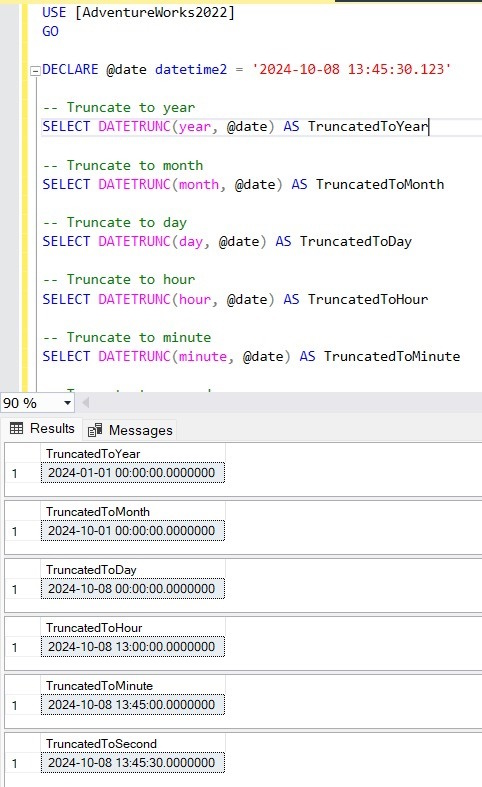
Here’s an example of truncating a DateTime value to different date parts using DATETRUNC.

USE [AdventureWorks2022]
GO

DECLARE @date datetime2 = '2024-10-08 13:45:30.123'

-- Truncate to year
SELECT DATETRUNC(year, @date) AS TruncatedToYear

-- Truncate to month
SELECT DATETRUNC(month, @date) AS TruncatedToMonth

-- Truncate to day
SELECT DATETRUNC(day, @date) AS TruncatedToDay

-- Truncate to hour
SELECT DATETRUNC(hour, @date) AS TruncatedToHour

-- Truncate to minute
SELECT DATETRUNC(minute, @date) AS TruncatedToMinute

-- Truncate to second
SELECT DATETRUNC(second, @date) AS TruncatedToSecond
SQL

Output

Output

Use Cases

DATETRUNC offers several advantages for common date truncation use cases in SQL Server, making it easier to,

  • Group by a Specific Date Part: You can use DATETRUNC to group data by a specific date part (e.g., by month, day, or hour).
  • Remove Time from Datetime Values: Often, developers need to work with only the date part, ignoring the time part.
  • Aggregate Data at Different Levels: DATETRUNC makes it easy to aggregate data at different levels of granularity such as hourly, daily, weekly, or monthly.
  • Date Range Filtering: DATETRUNC helps simplify date-based filtering where you need to match specific parts of a date.

Comparing DATETRUNC with Traditional Methods

Before the introduction of DATETRUNC, SQL Server developers typically used a combination of DATEADD, DATEDIFF, and CONVERT to achieve similar results. Let’s compare DATETRUNC with traditional approaches.

Truncating to Day

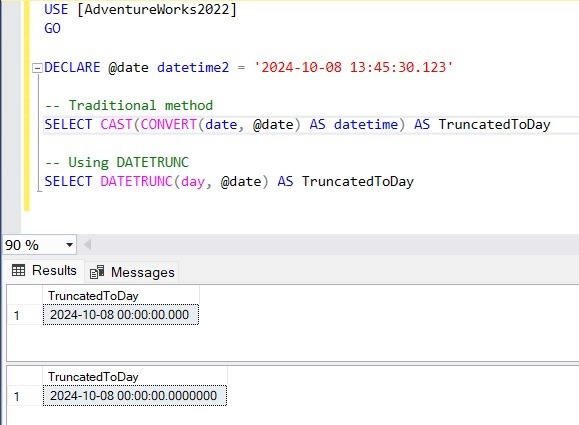
The DATETRUNC approach is much simpler and more intuitive compared to the CAST and CONVERT methods. Here’s how you might truncate a datetime value to the day using traditional methods:

USE [AdventureWorks2022]
GO

DECLARE @date datetime2 = '2024-10-08 13:45:30.123';

-- Traditional method
SELECT CAST(CONVERT(date, @date) AS datetime) AS TruncatedToDay;

-- Using DATETRUNC
SELECT DATETRUNC(day, @date) AS TruncatedToDay;
SQL

Output

SQL

Truncating to Month and Year

USE [AdventureWorks2022]
GO

DECLARE @date datetime2 = '2024-10-08 13:45:30.123';

-- Truncating to Month
-- Traditional method
SELECT DATEADD(month, DATEDIFF(month, 0, @date), 0) AS TruncatedToMonth;

-- Using DATETRUNC
SELECT DATETRUNC(month, @date) AS TruncatedToMonth;

-- Truncating to Year
-- Traditional method
SELECT DATEADD(year, DATEDIFF(year, 0, @date), 0) AS TruncatedToYear;

-- Using DATETRUNC
SELECT DATETRUNC(year, @date) AS TruncatedToYear;
SQL

Conclusion

By replacing more complex combinations of DATEADD and DATEDIFF with a single, readable function, DATETRUNC helps reduce query complexity, improve maintainability, and streamline date-based calculations.

As a SQL professional, mastering DATETRUNC will enhance your ability to write clean and efficient T-SQL code, making it easier to work with DateTime data in SQL Server 2022. Whether you're aggregating sales by month or grouping website traffic by hour, DATETRUNC can be a valuable tool in your SQL library.

FULL PYTHON + MS SQL SCRIPT (BEST PRACTICE)

  FULL PYTHON + MS SQL SCRIPT (BEST PRACTICE) import pyodbc # ----------------------------------------- # SQL CONNECTION (EDIT THIS PART) # ...